
Content Delivery Networks (CDN)
A CDN (Content Delivery Network) is a globally distributed cache. Servers at the edge — close to users — store copies of your content so requests for that content terminate near the user instead of traveling all the way to your origin. The result is lower latency, lower egress bandwidth from your origin, and substantially better reliability.
In a system design interview, the moment you talk about static assets, media, or any kind of “read-heavy public content,” a CDN should appear in the diagram.
What a CDN actually caches
Section titled “What a CDN actually caches”Three buckets, in increasing order of difficulty:
Static assets — JavaScript, CSS, fonts, images, downloadable files. The boring 80% of CDN traffic. These have stable URLs, can be aggressively cached, and rarely change.
Media — video segments, large images, audio. Same principles, larger objects, more bandwidth. Adaptive streaming protocols (HLS, DASH) work especially well with CDNs because each segment is a separate cacheable file.
Dynamic-ish content — HTML pages, API responses. Cacheable for short windows (seconds to minutes) and often segmented by user attributes (logged in vs not, geography). This is where CDNs stop being trivial and start needing thought.
Push vs pull
Section titled “Push vs pull”There are two ways content gets to the edge:
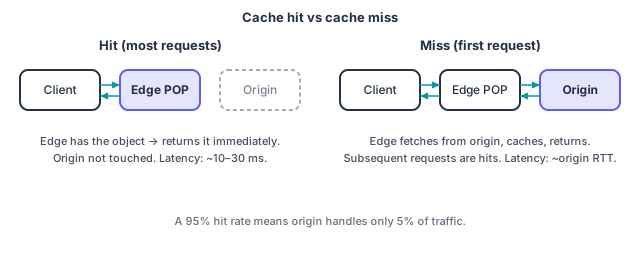
Pull (lazy). The CDN fetches from origin only when a client requests something the edge does not have. The first request is a miss (slow); subsequent requests are hits (fast) until the cache entry expires. Almost all modern CDNs default to this model — it scales to large catalogs without manual work.
Push (proactive). You publish content to the CDN directly; clients can only request what you’ve already pushed. Used for previewable releases or extremely high-traffic launches where you can’t tolerate the first-request miss.
Most interviews call for pull. Mention push only if the prompt is something like a game launch or a globally synchronized release.
Cache control: TTLs, revalidation, and invalidation
Section titled “Cache control: TTLs, revalidation, and invalidation”The CDN decides how long to keep an object using HTTP cache headers. The ones that matter:
Cache-Control: max-age=…— how long the edge can serve without checking origin. The single most important header.Cache-Control: s-maxage=…— likemax-agebut only for shared caches (CDNs). Lets you set a long edge TTL while keeping browser TTL short.Cache-Control: stale-while-revalidate=…— serve the stale copy while fetching a fresh one in the background. Brilliant for hiding origin latency on near-misses.Cache-Control: stale-if-error=…— serve the stale copy if origin is unreachable. Free reliability win.ETag/Last-Modified— used for conditional revalidation (304 Not Modified) when an object expires.
The most common rookie mistake is using a single short TTL everywhere “to be safe.” That defeats most of the CDN’s value. The senior pattern:
- Hash the URL. Asset filenames include a content hash (
app.7f3a.js). Each version is a new URL, so you can setmax-age=31536000, immutableand never worry about staleness. - Use short TTLs only for genuinely dynamic content. A homepage HTML response might be 60 seconds; an API endpoint might be 5–30 seconds.
When you do need to invalidate before TTL expiry — say you pushed a bad version of index.html — the CDN gives you a purge API. Purges are slow (seconds to minutes), expensive at scale, and generally rate-limited. Prefer URL versioning over purging.
Cache keys and personalization
Section titled “Cache keys and personalization”The cache key is what the CDN uses to look up an object. By default it’s the URL, but you can include or exclude headers, query strings, and cookies. Two patterns:
Single shared object. Vary nothing; everyone gets the same response. Highest hit rate, no personalization.
Sharded by user dimension. Vary by language (Accept-Language), country (CF-IPCountry), device class, or auth state. Hit rate drops but content is correctly targeted. Use the smallest set of dimensions that does the job. Adding cookies to the cache key is almost always a mistake — the hit rate plummets toward zero.
For per-user content (a private inbox, a personalized feed), the answer is usually don’t put it through the CDN’s cache at all — just use the CDN for TLS termination and routing.
Signed URLs and access control
Section titled “Signed URLs and access control”Public CDN content is open to anyone with the URL. For private content (paid videos, customer documents, private images), you don’t want to abandon the CDN’s reach — you want signed URLs.
The pattern: your application generates a URL with an expiring signature (HMAC of path + expiry + private key). The CDN validates the signature on each request and rejects expired or tampered URLs. The user can stream the content but cannot share the URL after it expires.
Two refinements you may hear about:
- Signed cookies — one cookie unlocks a whole prefix, useful for multi-segment streaming.
- Token authentication — a short-lived bearer token in the URL; some CDNs validate against a JWKS.
Either way, the asset itself never needs to live on application servers, and you never spend egress bandwidth proxying it. The CDN does the gatekeeping for you.
Failure modes worth mentioning
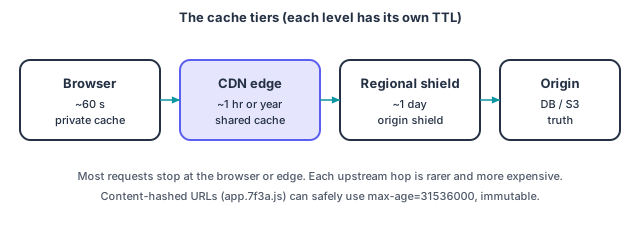
Section titled “Failure modes worth mentioning”Origin overload during cold cache. A new region goes live, a popular asset is purged, or a sudden viral event blows out the cache. Mitigations: stale-while-revalidate, stale-if-error, request coalescing (one origin fetch per unique URL even under 1M concurrent edge requests), and origin shields (a regional cache tier that absorbs traffic before it hits origin).
Cache poisoning. Attackers feed bad headers, the CDN keys on them, and the wrong content is served to everyone. Mitigation: be explicit about which headers vary the cache key; never trust unsanitized input as a cache dimension.
Tier separation. Browser cache, CDN edge cache, regional shield, origin. Each level has its own TTL. Stale content at any level can confuse users. Document the chain when you talk about it.
What to say in an interview
Section titled “What to say in an interview”If the prompt is anything with public content at scale, drop a clean one-liner:
“Static assets and media are served via a CDN with content-hashed URLs, so we cache them at the edge for a year. HTML responses are cached for 60 seconds with
stale-while-revalidate=600, so a request after expiration still returns instantly while the edge refreshes in the background. Private media uses signed URLs that expire in 5 minutes.”
That’s three sentences, and it covers TTL strategy, revalidation, and access control — most of what an interviewer wants to hear about CDNs.